Organization: International Protective Services, Inc. (IPS) Product: NorthStar Courier Command (NSCC) — NSCC w/Accounting, HR and Payroll Document version: August 21, 2026 Audience: Executive leadership, finance leadership, HR, and back-office operations Live demo: https://nscc-beacon-demo.web.app/demo2/ Filename note: File stem remains NSCC_NATIVE_FINANCE_* for link stability; product name in prose is NSCC w/Accounting, HR and Payroll (do not call the stack “Native Finance” alone).
Living module map: see
NSCC_FINANCE_HR_PAYROLL_BLUEPRINT.md(auto-updated from code). This executive brief is the narrative / charts companion. Customer walkthrough:NSCC_ACCT_HR_PAYROLL_CUSTOMER_PACK.md.
NorthStar Courier Command (NSCC) is IPS's operations and coordination platform for courier, patrol, and guard services. Beyond dispatch and field coordination, NSCC includes a production-grade back-office layer — NSCC w/Accounting, HR and Payroll — covering:
Today IPS runs in a dual-mode architecture:
| Mode | Where used | Finance / HR role |
|---|---|---|
| Sage bridge (live production) | Main NSCC (/ and /demo) |
Operations data stages to Sage 300 CRE; CRE remains system of record for posted AR, payroll, and job cost |
| NSCC w/Accounting, HR and Payroll (native) | /demo2 sandbox (and native SKU) |
Full GL, AR, AP, bank, payroll, and HR workflows in NSCC — no Sage write-back required on deliver |
This document describes the native platform — accounting, payroll, and HR — its supporting data, controls, and the strategic case for why it may represent a better long-term solution than extending Sage 300 CRE as the primary operational finance and HR interface.
Bottom line for leadership: NSCC closes the gap between what happens in the field and what finance and HR see in the books. Where Sage 300 CRE requires manual staging, promotion, and posting across disconnected modules, NSCC can draft invoices from delivered trips, pay field work into the books, run office payroll, track workers-comp from incident reports, and produce board packages — from the same console dispatchers already use. Staff stay in Easy mode (outcome language) or open Advanced when they need the full ledger.
IPS operates three revenue lines — courier (CIT), patrol, and guard services — with complex job costing dimensions (customer, site, route, department). Finance staff face recurring friction:
NSCC w/Accounting, HR and Payroll addresses these by embedding accounting and people operations inside the operations platform — with audit trails, role gates, and automated drafting from field events.
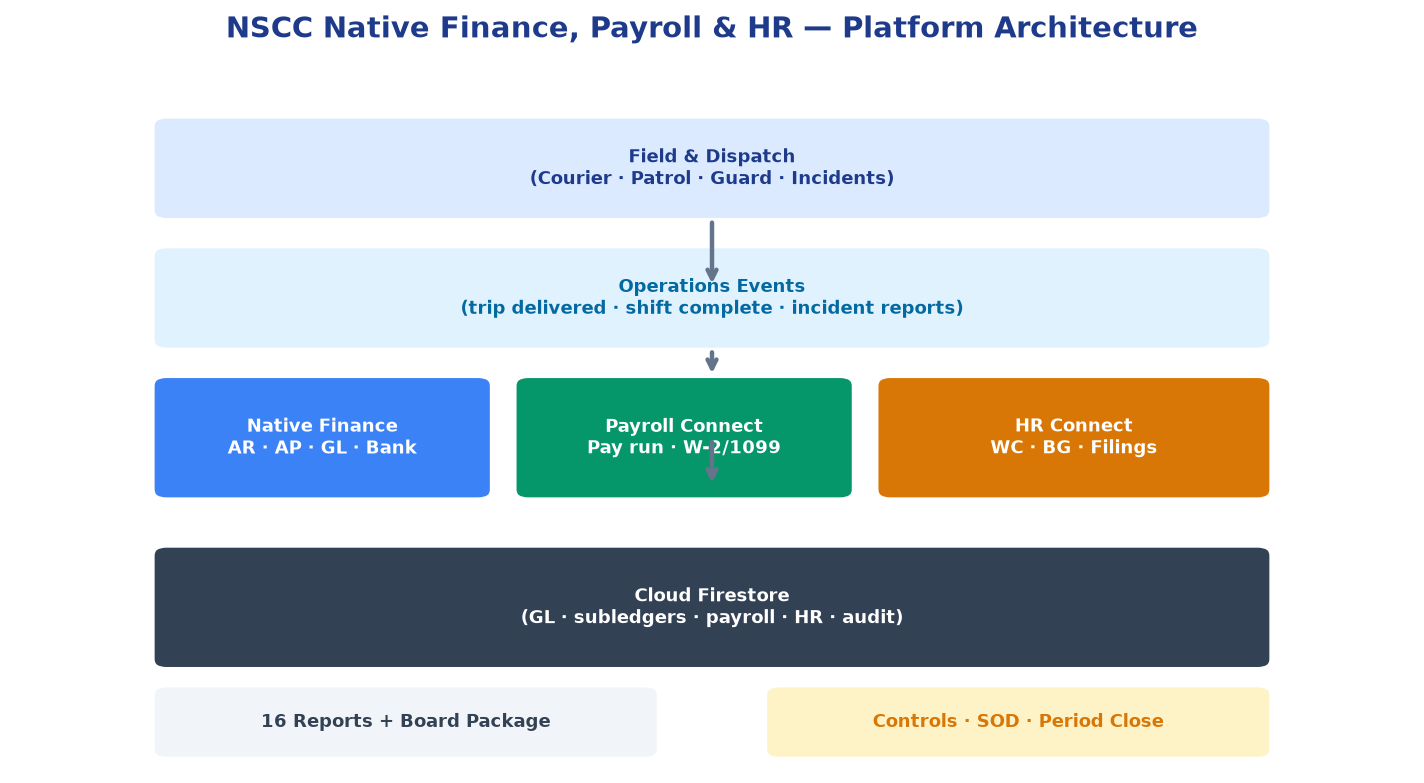
The native stack stores authoritative ledger data in Cloud Firestore (demo sandbox or live org collections), with a 21-account IPS chart of accounts and double-entry journal posting on every consequential action.
!NSCC w/Accounting, HR and Payroll architecture
Data flow (native mode):
Contrast with Sage 300 CRE path:
NSCC_JC_Staging / NSCC_PR_StagingThe Accounting view provides a single shell for finance. Easy mode mirrors a QBO-style curated set; Advanced unlocks the full catalog (~26 modules). Living ids/labels: NSCC_FINANCE_HR_PAYROLL_BLUEPRINT.md.
| Tab | Primary users | Capabilities |
|---|---|---|
| Dashboard | CEO, controller, finance | Open AR, cash, net income at a glance |
| Invoices | Billing, AR clerk | Create today’s invoices; apply payments; collect open AR |
| Pay field work | Ops / payroll clerk | Pay courier/patrol/guard hours and trips from delivered work |
| Statements | AR | Customer statements and dunning |
| Recurring | Billing | Retainers and monthly contract billing |
| Bills | AP clerk | Vendor bills, approvals, payment runs |
| Banking | Treasury | Accounts, deposits, transfers, reconciliation |
| Chart of Accounts | Controller | GL account list and structure |
| General Ledger | Controller | Journals and manual GL entries |
| Reports | All finance | Registers and management packs (P&L, BS, aging) |
| Tab | Primary users | Capabilities |
|---|---|---|
| Bank Feeds / Purchasing / Vendor Credits / Attachments | AP / treasury | Import feeds, POs, credits, document store |
| Fixed Assets / Dimensions / Budget / Period Close | Controller | Assets, tagging, plan vs actual, close checklist |
| Cash Flow / Tax & Deferred / Tax Filing Packs | Tax / finance | 13-week forecast; sales tax / deferred; jurisdiction packs |
| Analytics / Compliance / Consolidation / IC Matching | Controller / board | Trends, 1099 helpers, entity views, intercompany |
| Audit Trail | Internal audit | Immutable finance log of who changed what |
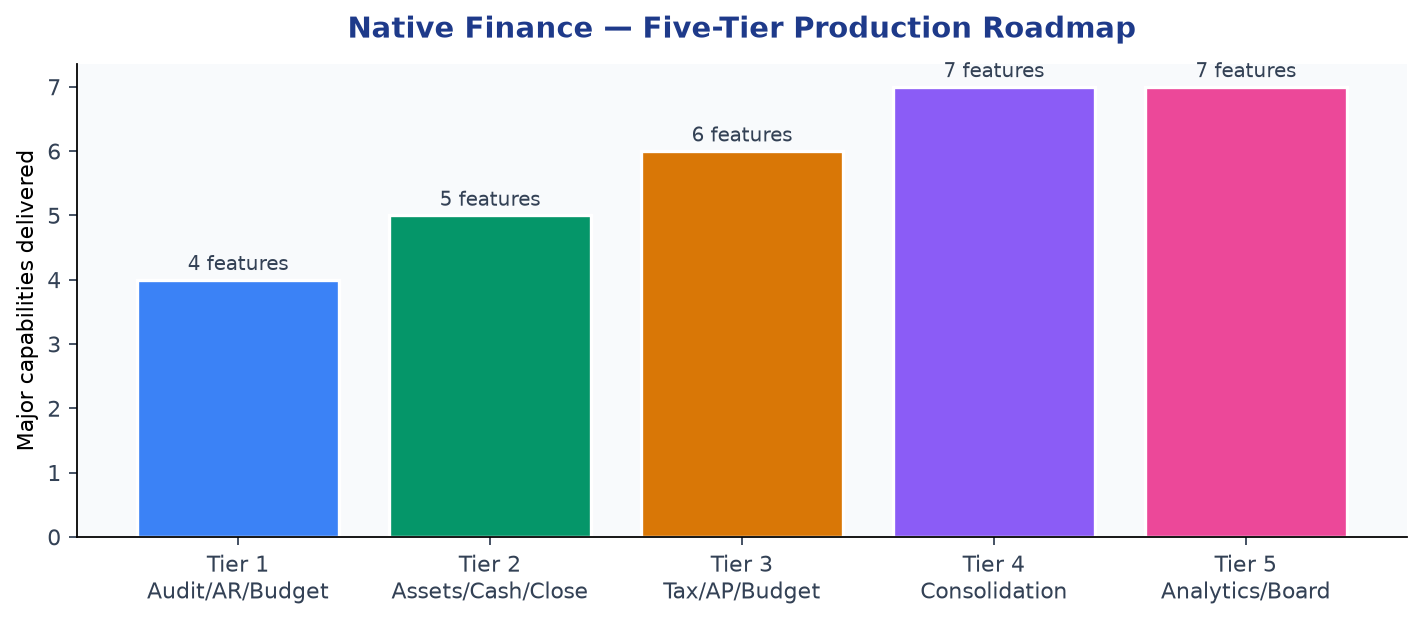
!Accounting capability coverage by tier
The native stack was delivered in five incremental accounting tiers, then Payroll and HR shells — each adding production controls:
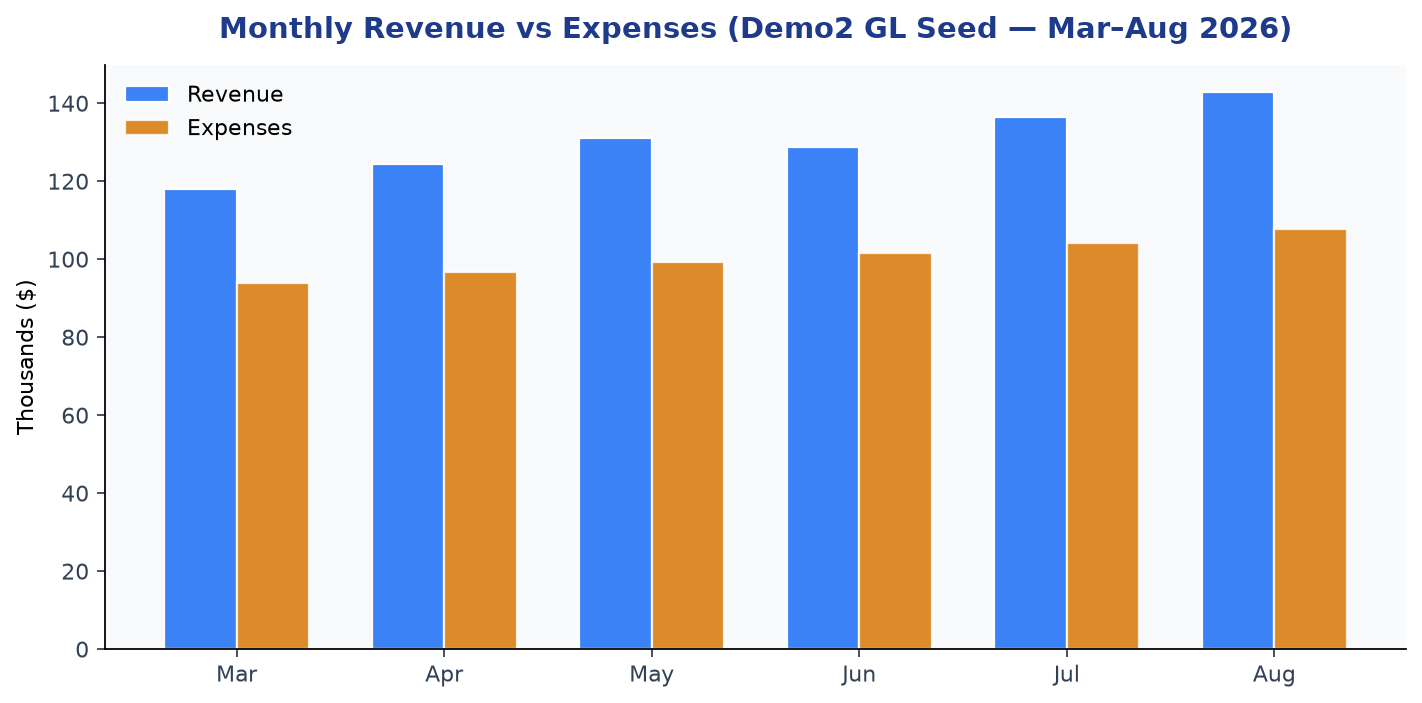
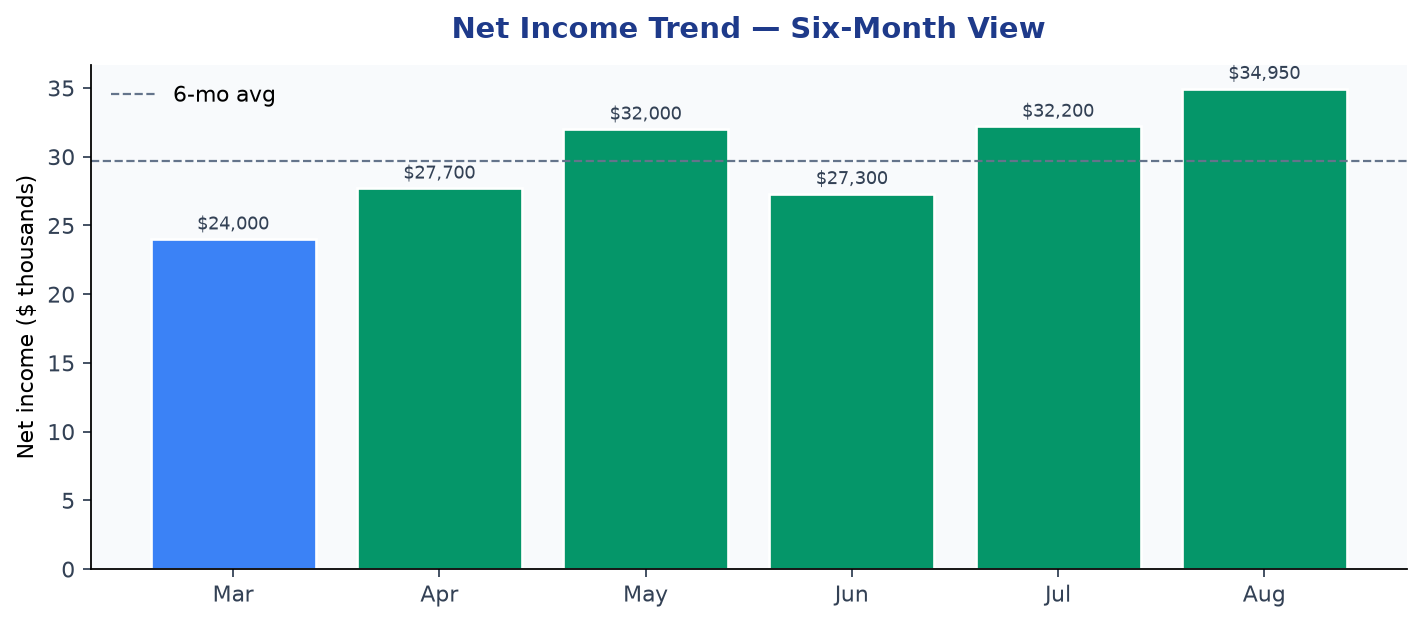
FINANCE_AUDIT_EVENTS)The demo2 environment seeds six months of synthetic GL activity (March–August 2026) designed to populate executive dashboards and trend charts. These figures illustrate the reporting depth available without waiting for month-end Sage exports.
| Month | Revenue | Expenses | Net income | Margin |
|---|---|---|---|---|
| Mar 2026 | $118,000 | $94,000 | $24,000 | 20.3% |
| Apr 2026 | $124,500 | $96,800 | $27,700 | 22.2% |
| May 2026 | $131,200 | $99,200 | $32,000 | 24.4% |
| Jun 2026 | $128,800 | $101,500 | $27,300 | 21.2% |
| Jul 2026 | $136,400 | $104,200 | $32,200 | 23.6% |
| Aug 2026 | $142,750 | $107,800 | $34,950 | 24.5% |
Six-month totals: Revenue $781,650 | Expenses $603,500 | Net income $178,150 | Avg margin 22.8%
| Account | Name | Budget | Actual | Variance |
|---|---|---|---|---|
| 5000 | Payroll Expense | $62,000 | $58,400 | $(3,600) favorable |
| 5100 | Vehicle & Fuel | $8,500 | $11,240 | $2,740 unfavorable |
| 5200 | Insurance | $4,200 | $4,200 | $0 |
| 5900 | Bad Debt Expense | $500 | $0 | $(500) favorable |
Variance commentary is captured in-system (e.g., "Fuel over budget — Gulf Fleet rate increase +2 extra route days").
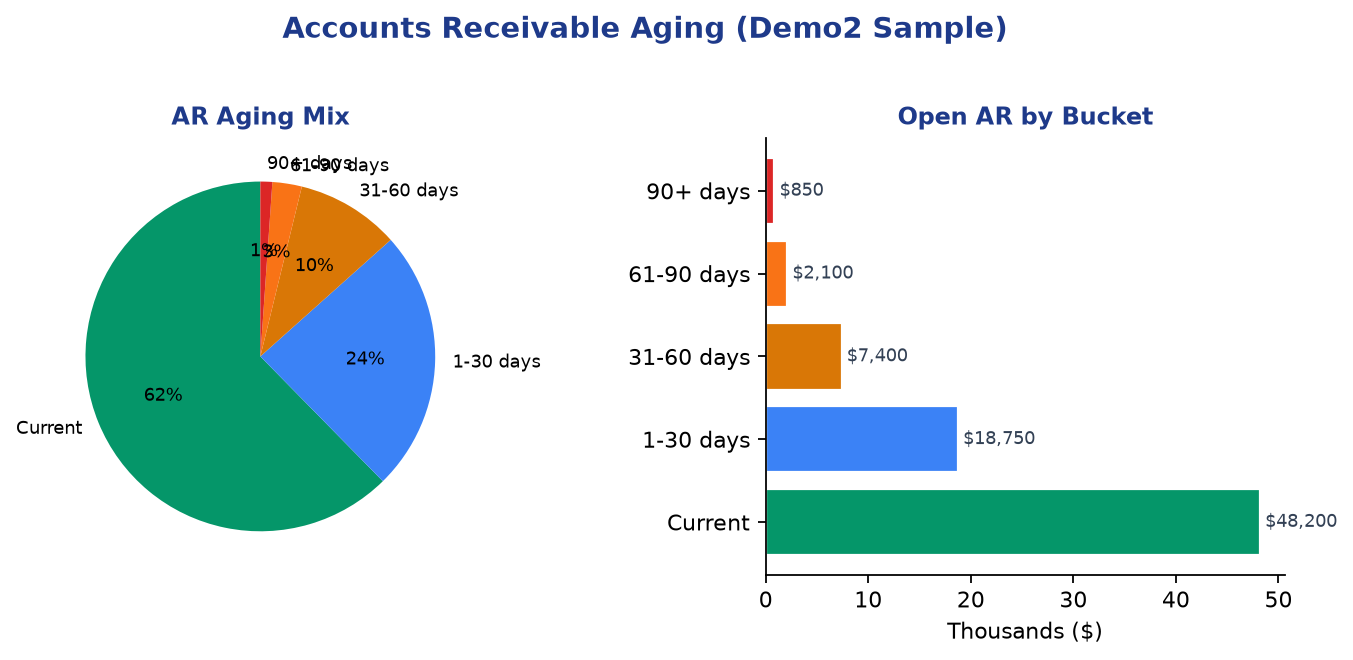
| Bucket | Amount | % of open AR |
|---|---|---|
| Current | $48,200 | 62% |
| 1–30 days | $18,750 | 24% |
| 31–60 days | $7,400 | 10% |
| 61–90 days | $2,100 | 3% |
| 90+ days | $850 | 1% |
Credit limits are enforced at AR approval — invoices exceeding customer limits are flagged before GL posting.
All reports support on-screen preview, Excel export, CSV export, and print. A full finance workbook exports all 16 sheets; the board package adds comparative P&L, anomaly summary, footnotes, and integration health.
| # | Report | Category | Use case |
|---|---|---|---|
| 1 | Trial Balance | Financial | Pre-close balance verification |
| 2 | Profit & Loss | Financial | Period performance |
| 3 | Balance Sheet | Financial | Position statement |
| 4 | GL Detail | Ledger | Audit / pivot analysis |
| 5 | Job Margin | Job costing | Per-trip/shift profitability |
| 6 | P&L by Dimension | Job costing | Customer/site/route rollup |
| 7 | AR Open Items | Subledger | Collections prioritization |
| 8 | AR Aging | Subledger | DSO management |
| 9 | AP Open Items | Subledger | Cash requirements |
| 10 | Budget vs Actual | Financial | FP&A variance |
| 11 | Cash Flow Forecast | Financial | 13-week liquidity |
| 12 | Sales Tax Summary | Subledger | Filing preparation |
| 13 | Division Consolidated P&L | Job costing | Department performance |
| 14 | Comparative P&L (MoM) | Financial | Trend analysis |
| 15 | Fixed Asset Register | Ledger | Depreciation audit |
| 16 | Journal Import | Ledger | Excel round-trip JE posting |
Editable round-trip: AR open items, AP open items, and journal import templates can be exported to Excel, edited offline, and re-imported — reducing manual re-keying.
| Role | Typical user | Key permissions |
|---|---|---|
| Clerk | Data entry | View, import bank statements |
| Approver | Billing manager | Approve AR/AP, post bills, record payments, reconcile, deposit, post payroll |
| Admin | Controller / finance lead | Manual journals, close/reopen fiscal periods |
| Action | Rule |
|---|---|
| Approve AR | Cannot approve own draft invoice |
| Approve AP | Cannot approve own bill |
| Post AP | Cannot post own created/approved bill |
| Record payment | Cannot pay own approved document |
| Manual JE | Cannot post own draft journal |
A small-team override (admin-only) relaxes SOD when one person handles all accounting — documented with an active banner.
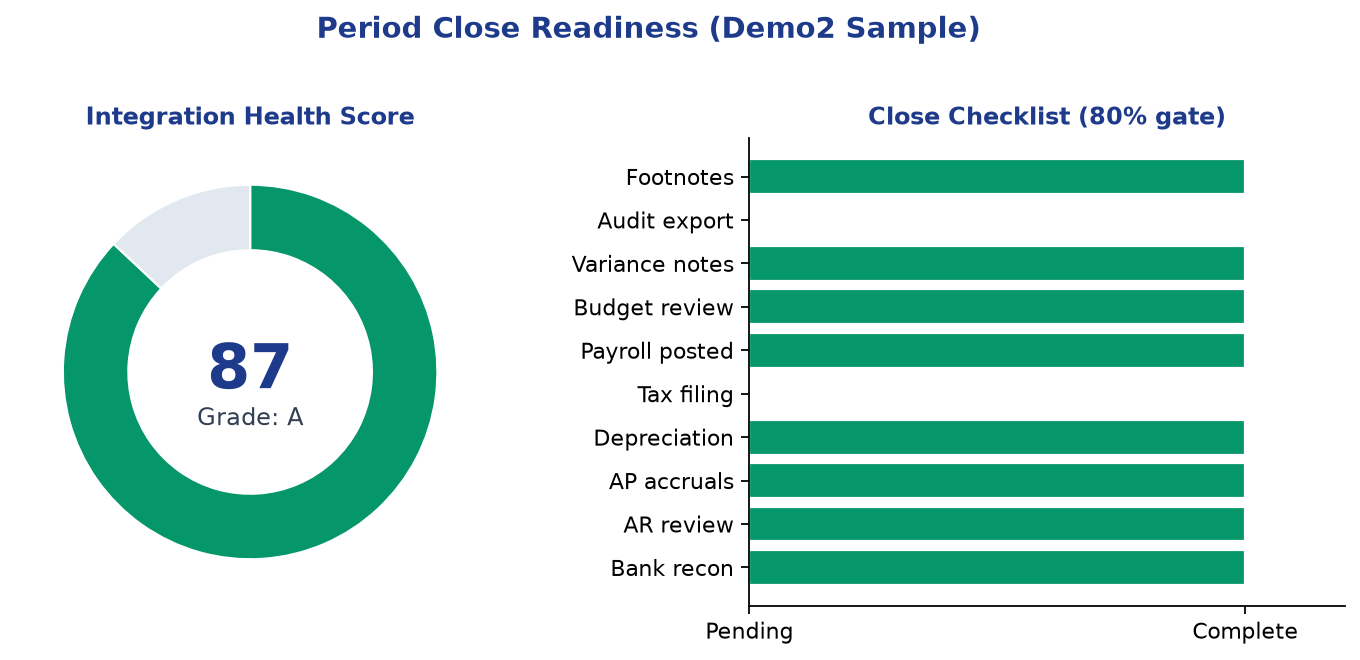
!Close readiness and integration health
A composite 0–100 score evaluates close readiness:
| Check | Weight impact |
|---|---|
| AR drafts pending | −10 if >10 drafts |
| AP workflow backlog | −8 if >15 open bills |
| GL activity present | −25 if empty |
| Trial balance balanced | −30 if out of balance |
| Sage sync status | Informational |
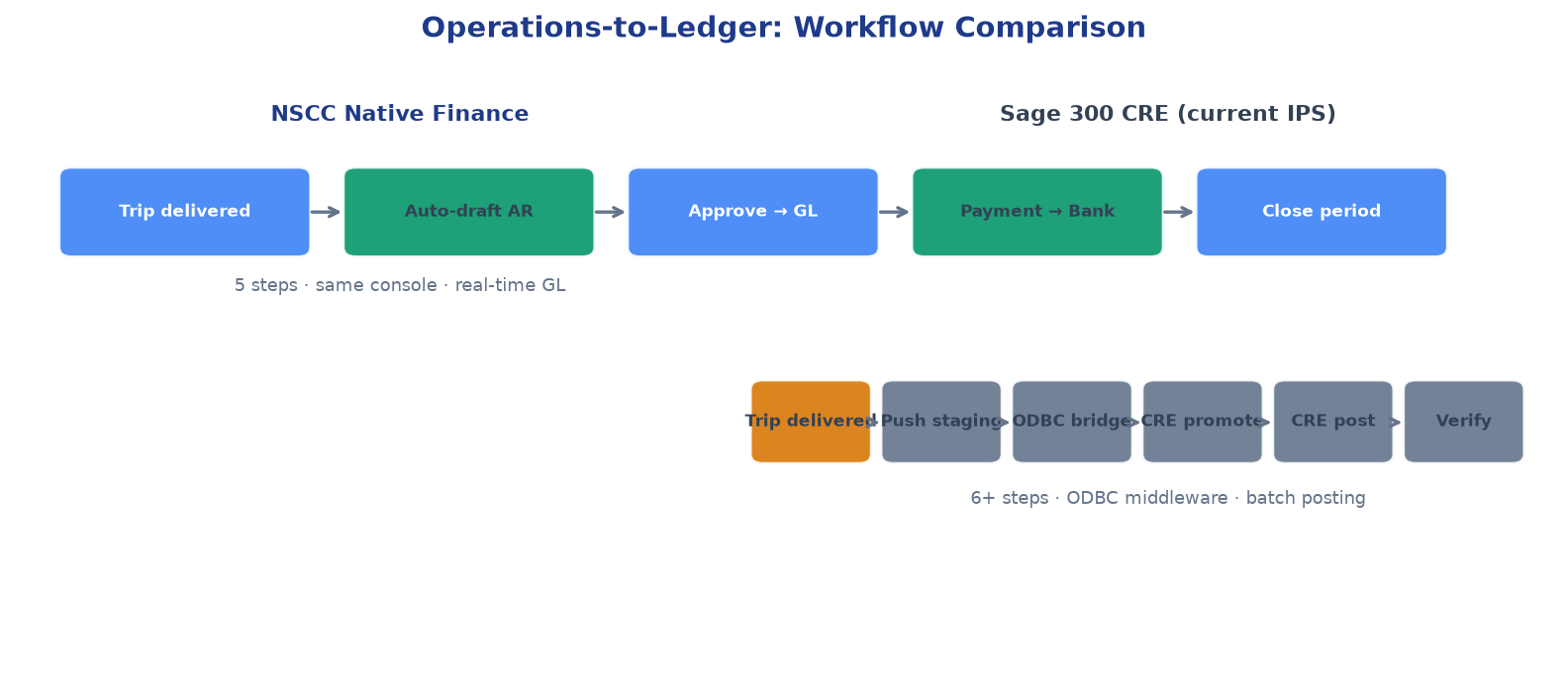
NSCC's strategic advantage is native coupling between field events and financial records.
| Operational event | NSCC native response | Sage 300 CRE path |
|---|---|---|
| Trip delivered | Auto-draft AR invoice | Manual JC staging push |
| Shift completed | Billable hours → payroll calc | PR staging push |
| Customer rate change | Job margin variance report | Rate card ODBC sync |
| Credit memo needed | In-app credit memo → GL | Manual CRE adjustment |
| Bank deposit | Undeposited funds → cash | CRE Cash Management |
Job costing dimensions are stamped on every GL line: customer, site, route, department, class, and job reference. This enables P&L by any dimension without CRE report writer customization.
!Operations-to-ledger workflow comparison
In /demo2, Payroll (and HR & Compliance) replace Sage Connect in the left nav for the native SKU. Easy mode shows Pay runs / Employees / Reports / Year-End; Advanced unlocks the full ~12-module payroll catalog (tax setup, premiums, garnishments, ACH, certified payroll, etc.). Pay field work lives under Accounting (ops-driven hours/trips), not under Payroll → Pay runs.
| Tab | What staff do |
|---|---|
| Payroll | Choose weekly or bi-weekly pay frequency for the company; preview a pay run from shift hours; review per-employee earnings (hours, gross, tax, net); Run payroll posts a balanced JE (Dr 5000 Payroll Expense → Cr 2010 Payroll Payable + Cr 2020 Payroll Tax Payable). Net pay sits in 2010 until disbursed from Cash — Payroll (1010). Export earnings to Excel. |
| Pay Profiles | Rate, pay type, work state, federal withholding, and deductions for the roster. Paginated (50/page) for demo field scale (~125 seeded; target ~205 field + 15 office). |
| Year-End | Native W-2 summary from posted payroll runs (Box 1 wages, Box 2 federal, Box 17 state). 1099 vendor summary from posted AP bills (≥ $600). Excel export. Provider e-file hook for Check / Gusto when configured. |
Payroll admin sets one pay frequency for the company (not per employee). Field and office staff on the same roster are paid on the same cadence. Changing frequency applies to the next preview / pay run; already-posted runs stay in history.
| Frequency | Periods / year | Salaried paycheck | Typical hours in a run |
|---|---|---|---|
| Weekly | 52 | Annual salary ÷ 52 | ~40 regular hours |
| Bi-weekly | 26 | Annual salary ÷ 26 | ~80 regular hours |
Overtime still follows the FLSA weekly 40-hour test. IPS (or any tenant) picks weekly or bi-weekly in Payroll next to the provider control. Demo seed defaults to bi-weekly so the three posted sample runs match a 26-pay-year calendar.
post_payroll is an approver/admin permission.Payroll's companion shell is HR & Compliance — people operations that Sage 300 CRE does not host next to dispatch. Easy mode covers Overview / Employees / Leave / Documents / Reports; Advanced adds recruiting, I-9, WC, filings, regulations, and more (~21 modules).
| Tab | Primary users | Capabilities |
|---|---|---|
| HR | HR, ops managers | Multi-state compliance snapshot (minimum wage, paid leave, SUI, workers comp, withholding) for the employee's work states. Export HR workbook (Excel). |
| Regulations | HR, payroll | Searchable knowledge base across 17 states (MA, NH, CT, RI, NY, NJ, FL, GA, NC, VA, OH, IL, PA, MI, WI, MN, IN). Topics: wages, paid leave / PFML, workers comp, new hire, SUI, withholding. Optional AI Q&A over the same corpus. |
| Background | HR | Request background checks (sandbox or configured provider); status board (name, package, provider, status, requester). |
| WC Claims | HR, safety | Open a workers-comp claim from a field Incident Report (guard / patrol / courier). Track status (open → reported → investigating → closed), carrier #, estimate. |
| Discipline | HR, supervisors | Personnel-linked log (type, reason, action, actor). Also available from Master Data personnel rows. |
| Filings | Payroll, HR | Preview quarterly SUI, withholding, and new-hire filings per state; keep a recent-filings log. |
| Band | Cap / target |
|---|---|
| Office / leadership | ~15 |
| Field staff (courier, patrol, guard) | Baseline ~45 → growth to ~205 |
| Total personnel cap | ~220 |
| Demo seed (pagination exercise) | ~125 field rows; UI page size 50 |
Workers-comp reserves, payroll tax payable, and 1099 accruals are GL events. Incident reports already exist in NSCC field apps. HR & Compliance turns those operational records into claims, filings, and year-end forms without a second HRIS login.
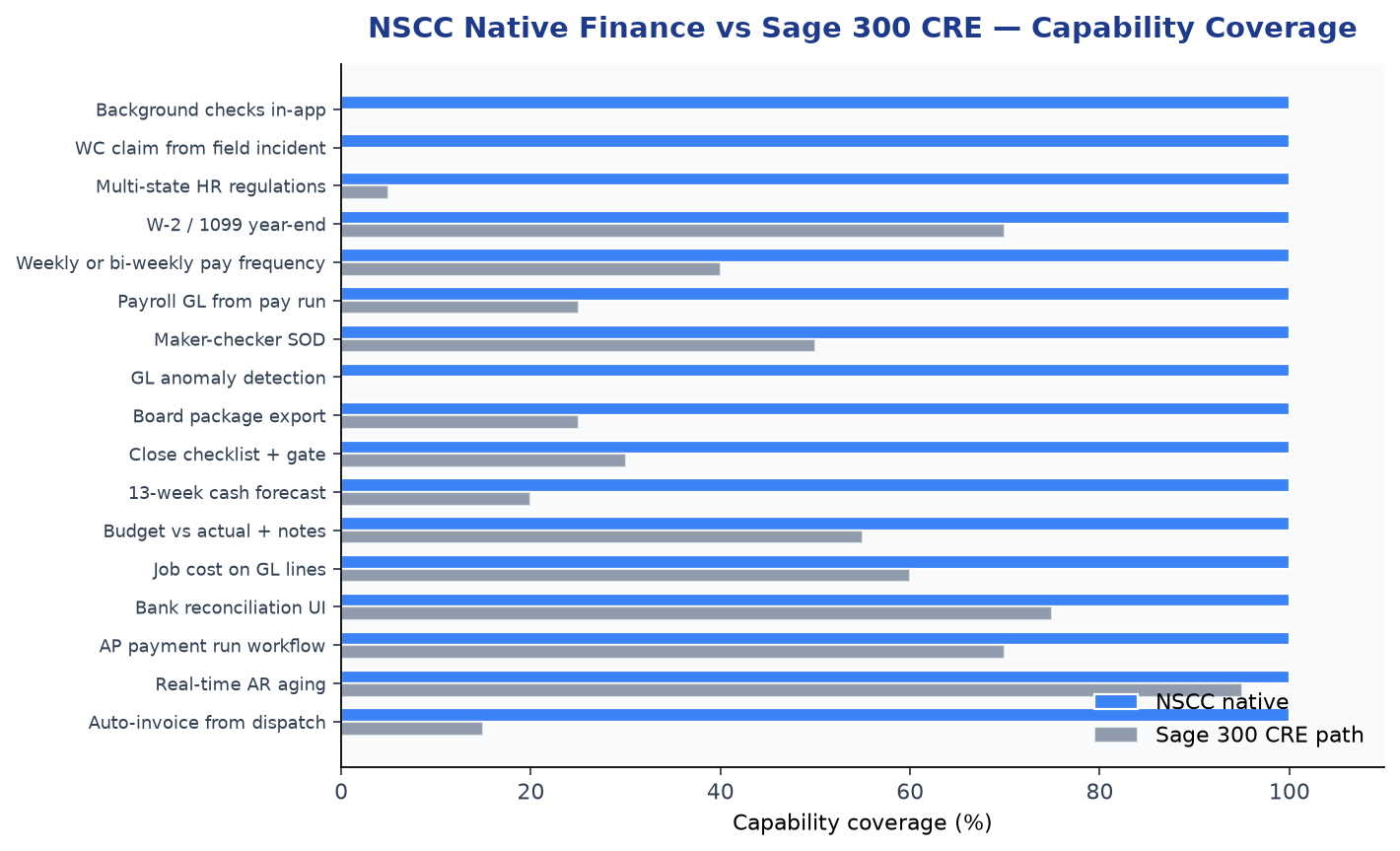
!Feature comparison: NSCC native vs Sage 300 CRE
| Capability | NSCC native finance | Sage 300 CRE (current IPS path) |
|---|---|---|
| Auto-invoice from dispatch | Yes — on trip delivery | No — manual staging push required |
| Real-time AR aging | Yes — live from approved invoices | Yes — after CRE post |
| AP payment run workflow | Draft → approve → execute in-app | CRE AP module (separate login) |
| Bank reconciliation UI | Import, match, deposit in one tab | CRE Cash Management |
| Job cost dimensions on GL lines | 6 dimensions per line | CRE Job Cost (separate module) |
| Budget vs actual + commentary | Native with variance notes | CRE Budget (setup-heavy) |
| 13-week cash forecast | Built from AR/AP/recurring | Manual / third-party |
| Close checklist + readiness gate | 10 tasks + automated gate | Manual close procedures |
| Board package export | 20-sheet Excel with footnotes | Crystal Reports + manual assembly |
| GL anomaly detection | Rule-based scan | Not native |
| Audit trail (append-only) | Firestore event log | CRE audit (module-dependent) |
| Maker-checker enforcement | Built-in SOD with override | CRE security roles (IT-configured) |
| Mobile / field visibility | Same platform as dispatch | None |
| Payroll GL posting | One-click from pay run | PR staging → CRE promote → post |
| Company pay frequency | Weekly or bi-weekly (org setting) | CRE payroll cycle setup |
| W-2 / 1099 year-end | Native summaries + Excel | CRE Payroll / AP year-end |
| Multi-state HR regulations | 17-state searchable KB in-app | Not in CRE dispatch |
| Background checks | Request + status in HR & Compliance | Third-party portal |
| WC from field incidents | Claim from Incident Report | Manual carrier / CRE note |
| Discipline log | Personnel-linked in NSCC | Separate HR file |
| State filings preview | SUI / withholding / new hire | CRE / MassTaxConnect / etc. |
| Implementation complexity | Web app — no ODBC bridge | ODBC middleware + CRE expertise |
| System of record maturity | Prototype / demo2 ready | 20+ years production at IPS |
NSCC w/Accounting, HR and Payroll is a production prototype for workflows and controls — not a certified tax/ACH replacement for Sage 300 CRE today. Sage remains appropriate when:
| Factor | Sage 300 CRE advantage |
|---|---|
| Regulatory audit | Established audit history; CPA familiarity |
| Tax remittance | Payroll tax filing and remittance workflows |
| Multi-entity consolidation | Mature intercompany and consolidation (NSCC Tier 5 is basic) |
| Vendor ecosystem | Bank feeds, payroll bureaus, CPA tools integrate with CRE |
| Historical data | Decades of posted transactions in CRE |
| Construction-specific modules | CRE job cost, AIA billing, retainage — industry depth |
Recommended path: Continue Sage 300 CRE as system of record for live IPS while using Demo 2 (NSCC w/Accounting, HR and Payroll) to prove workflows, train staff, and evaluate a phased migration. The Sage bridge path remains available — NSCC does not force a choice. Honest gaps (certified tax tables, bureau ACH, week-batch invoices, etc.): NSCC_ENTERPRISE_READINESS_PREP.md.
NSCC_FINANCE_MODE=native or equivalent SKU)/demo2** for Accounting + Payroll + HR UX; production cutover still requires CPA review, parallel run, data migration, and (for payroll tax remittance) a certified bureau or continued CRE PRNSCC_SYSTEM_CONFIGURATION.md| Collection | Purpose |
|---|---|
| chartOfAccounts | IPS 21-account COA |
| glEntries | Journal entries (balanced, dimension-tagged) |
| arInvoices | AR invoices and credit memos |
| arCustomers | Customer profiles, credit limits, terms |
| apBills | Vendor bills |
| apVendors | Vendor master (1099 fields) |
| purchaseOrders | PO for 3-way match |
| apPaymentRuns | AP check/ACH runs |
| bankAccounts | Bank account master |
| bankTransactions | Imported bank lines |
| bankRules | Auto-categorization rules |
| fiscalPeriods | Period open/closed status |
| financeAuditEvents | Append-only audit log |
| budgetLines | Budget by account/period |
| recurringJournals | Recurring accrual templates |
| fixedAssets | Fixed asset register |
| closeChecklist | Period-close task completion |
| collectionCases | AR collections workflow |
| salesTaxConfig | Tax rate configuration |
| deferredRevenue | Deferred revenue schedules |
| varianceNotes | Budget variance commentary |
| manualJeDrafts | Manual JE maker-checker drafts |
| financeFootnotes | Disclosure footnotes by period |
| intercompanyBalances | Inter-entity due-to/due-from |
| payrollRuns | Calculated pay runs + GL link (includes pay frequency) |
| payrollSettings | Company payroll settings (weekly vs bi-weekly frequency, provider) |
| employeePayProfiles | Pay rates, withholding |
| backgroundCheckRequests | Background check requests / status |
| workersCompClaims | WC claims (often from field incidents) |
| personnelDiscipline | Discipline log |
| regulatoryFilings | State filing previews / log |
| regulatoryRepository | Regulations knowledge-base metadata |
| Code | Account | Type |
|---|---|---|
| 1000 | Cash — Operating | Asset |
| 1010 | Cash — Payroll | Asset |
| 1050 | Undeposited Funds | Asset |
| 1100 | Accounts Receivable | Asset |
| 1500 | Equipment | Asset |
| 1510 | Accumulated Depreciation | Asset |
| 2000 | Accounts Payable | Liability |
| 2010 | Payroll Payable | Liability |
| 2020 | Payroll Tax Payable | Liability |
| 2030 | Sales Tax Payable | Liability |
| 2100 | Credit Card Payable | Liability |
| 2300 | Deferred Revenue | Liability |
| 3000 | Retained Earnings | Equity |
| 4000 | Courier Revenue | Revenue |
| 4100 | Patrol Revenue | Revenue |
| 4200 | Guard Revenue | Revenue |
| 5000 | Payroll Expense | Expense |
| 5100 | Vehicle & Fuel | Expense |
| 5200 | Insurance | Expense |
| 5900 | Bad Debt Expense | Expense |
| Document | Location |
|---|---|
| NSCC ↔ Sage 300 CRE Integration Guide | docs/NSCC_SAGE_CONSULTANT_BRIEF.md |
| Process AR and Payroll in Sage 300 CRE | docs/NSCC_AR_AND_PAYROLL_IN_SAGE_300_CRE.md |
| System Documentation | hosting/.../docs/SYSTEM_DOCUMENTATION.md |
| Live demo (NSCC w/Accounting, HR and Payroll) | https://nscc-beacon-demo.web.app/demo2/ |
This brief tracks NSCC w/Accounting, HR and Payroll as of August 21, 2026 (Accounting Easy/Advanced + Payroll + HR shells). Living module tables come from code via the blueprint generator. Demo figures are synthetic seed data for illustration. Production IPS financials remain in Sage 300 CRE unless and until a native migration is approved. OAuth client secrets, service-account keys, and Sage ODBC passwords are intentionally omitted.